

Ask EVE
Ask EVE is a conversational AI assistant built right into the Text Auto Report. Instead of hunting through sections to find an answer, you can ask a question in plain language and EVE will respond using the data in your report — no digging required.
Opening Ask EVE
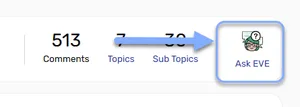
Section titled “Opening Ask EVE”Ask EVE is available directly from the report header.
- Open a Text Auto Report.
- In the report header, click the Ask EVE icon and label (top right, alongside the Comments, Topics, and Sub Topics stats).
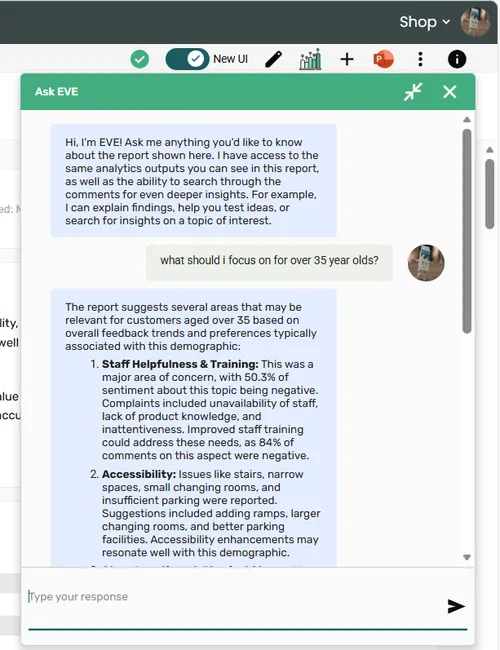
- The Ask EVE chat panel opens.
- Type your question and press Enter or click Send.
Resizing the Ask EVE panel
Section titled “Resizing the Ask EVE panel”When Ask EVE is open in its expanded floating view, you can drag it to exactly the size that works for you — wider, taller, or both at once.
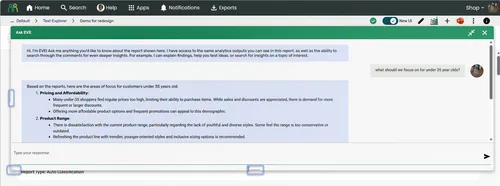
Grab any of these handles to resize:
| Handle | Where to grab | What it does |
|---|---|---|
| Left edge | Vertical bar on the left side | Drag left or right to change the panel width |
| Bottom edge | Horizontal bar along the bottom | Drag up or down to change the panel height |
| Bottom-left corner | Corner grip | Drag diagonally to resize width and height together |
The panel won’t shrink below 300×300px. Resize handles are only available in the expanded floating view — they don’t appear when the panel is collapsed or displayed inline.
Ask EVE in Dashboard Publisher
Section titled “Ask EVE in Dashboard Publisher”Ask EVE is also available when a Text Auto Report is embedded in a Dashboard Publisher dashboard. It works exactly the same way — click the Ask EVE button in the report header to open the chat panel and start asking questions about your data.
What you can ask
Section titled “What you can ask”EVE draws on the topics, sub topics, sentiment data, and comments in the report to answer your questions. Here are a few examples to get you started:
- “What are the main complaints customers have about delivery?”
- “Which topics have the most negative sentiment?”
- “Summarise what customers say about pricing.”
- “What emotions are most associated with staff helpfulness?”
EVE can only see what’s in the current report — it can’t access data from other projects or reports.
If you apply or change filters on the report, Ask EVE reinitialises with the updated context, so its answers always reflect the filtered view you’re looking at.
Frequently asked questions
Section titled “Frequently asked questions”Does Ask EVE have access to the raw comments?
Yes — Ask EVE can draw on the individual comments in your report to inform its answers, not just the aggregate statistics. So if you want EVE to quote specific responses or dig into the detail, it can.
Can Ask EVE access data from other projects or reports?
No. Ask EVE only has visibility of the data in the report you currently have open. It can’t compare results across projects or look back at historical runs.
Are my questions stored or used to train the model?
No. Questions asked through Ask EVE are handled in line with the HumanListening platform’s data handling and privacy policy — your conversations aren’t used to train or improve the model.