

Model only
A Model Only conversation is driven entirely by a predefined model. EVE follows the model’s rules exactly — probing when keywords are mentioned, prompting on unmentioned sub-topics when configured to do so — with no AI-generated responses. What you define in the model is precisely what participants experience.
Advantages:
- Complete control — every probe and prompt comes from your model; nothing is generated on the fly
- Consistency — all participants receive the same structured conversation experience
- Efficient analysis — responses are automatically coded against the model
- Reusable models — build a model once and apply it across multiple projects and sub-accounts
Setting up a Model Only conversation
Section titled “Setting up a Model Only conversation”-
Create or open a conversation — Create a new conversation or open an existing one.
-
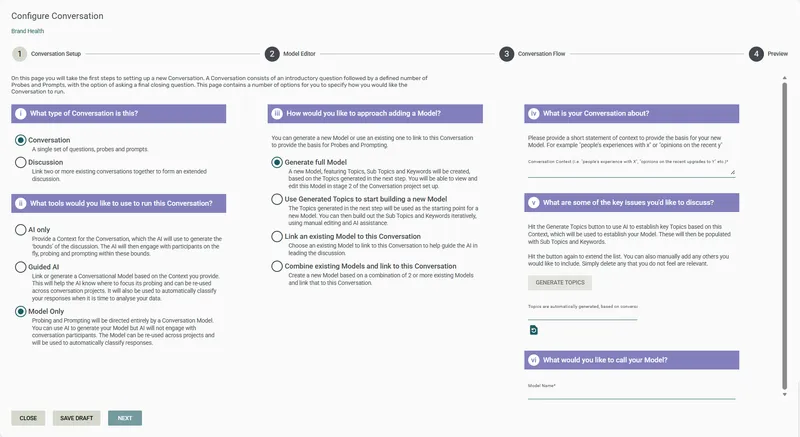
Select Conversation, then Model Only
-
Choose a model connection method:
- Generate full Model — AI generates a complete model (Topics, Sub Topics, Keywords) based on the context you provide. Enter a Model Name when prompted. You can review and edit the model in the model editor
- Use Generated Topics to start building a new Model — AI generates Topics only. Enter a Model Name when prompted, then build out the Sub Topics and Keywords yourself in the model editor
- Link an existing Model — connect a model you already own or that has been shared with you
- Combine existing Models — merge two or more existing models into a new combined model. Requires at least 2 models. You’ll set their priority order — when there are conflicts, the higher-priority model wins
-
Click Next to open the Model Editor.
-
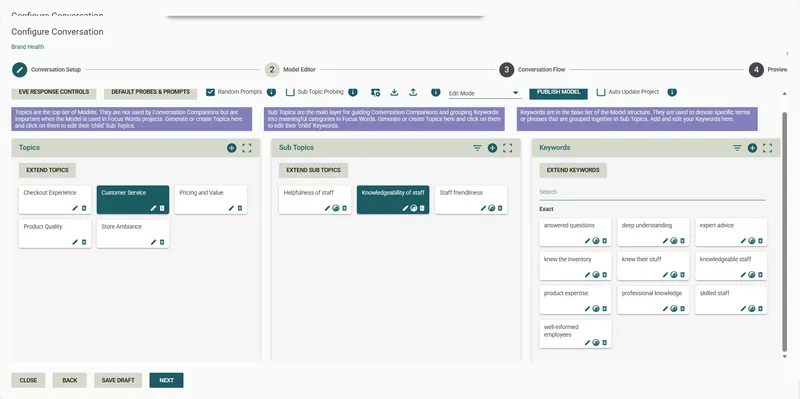
Review and edit the Model — check topics, sub-topics, keywords, and the probe and prompt wording for each sub-topic. In Model Only conversations, probe wording is especially important as there’s no AI fallback to rephrase things. See Models for a full guide to the model editor.
-
Click Next to move to the Conversation Flow step.
-
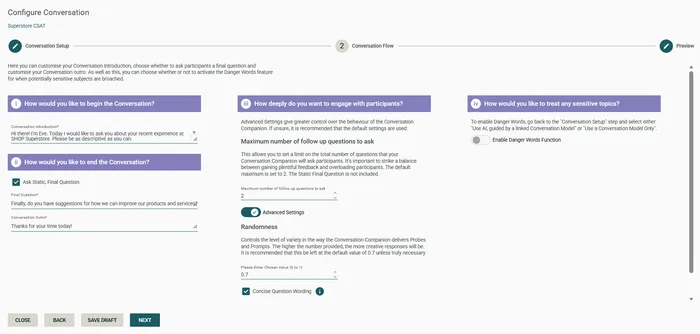
Enter the Conversation Introduction — the opening message EVE shows each participant. See Conversation settings.
-
Configure the final question and Outro — see Conversation settings.
-
Configure conversation flow:
- Probe on terms in initial response only — when checked, EVE only probes on sub-topics the participant mentions in their first response. Uncheck to allow probing on anything mentioned across all responses
- Maximum number of follow-up questions to ask — total cap on all questions EVE asks (default: 2). The static final question doesn’t count toward this limit
- Maximum number of Model Probes — cap on keyword-triggered probes from the model (default: 1)
- Maximum number of Random Prompts — cap on prompts for unmentioned topics (default: 1). Set to 0 to disable random prompting
-
(Optional) Enable Danger Words — see Conversation settings.
-
Click Next to move to the Preview step.
-
(Optional) Set a Conversation Companion Name and Avatar — see Conversation settings.
-
Click Preview Conversation to interact with EVE as a participant would. Click Back to return and adjust.
-
Click Publish to finalise, or Save Draft to save without publishing.
Frequently asked questions
Section titled “Frequently asked questions”What happens when a participant’s response doesn’t match any keyword?
In Model Only conversations, EVE falls back to a static “probe nothing” response — a general follow-up prompt (such as “Could you tell me more about your experience?”) to keep the conversation moving. Unlike Guided AI, there’s no AI stepping in with a generated response. You define the probe nothing wording in the model editor.
Should I generate a full model or just topics?
Generate full Model gives you a complete structure (topics, sub-topics, keywords, probe wording) to review and refine — faster to get started but requires careful review, especially the probe wording. Use Generated Topics gives you a starting point that you build out yourself. If you already have a model, just link it. In Model Only conversations, probe wording carries more weight since there’s no AI fallback — give it extra attention in the model editor.
Can I use Danger Words in a Model Only conversation?
Yes — Danger Words is available in Model Only (and Guided AI) conversations. See Conversation settings for configuration details.
Can I edit the model after the conversation is published?
You can edit the model at any time, but changes won’t take effect in live surveys until you republish the conversation. Any surveys using the conversation will automatically pick up the latest published version.
What is “Probe on terms in initial response only”?
When checked, EVE only probes on sub-topics the participant mentions in their very first response. Keywords mentioned later in the conversation won’t trigger additional probes. Unchecking allows EVE to probe on keywords mentioned at any point in the conversation.
What happens after I publish?
The conversation is ready to be inserted into a Survey Shaper survey. See Publish and deploy for the full deployment steps.