

Discussions
A Discussion links two or more published conversations together into a single extended session. EVE works through each conversation in sequence — running its introduction, probes, and prompts — before moving on to the next. From the participant’s perspective, it’s one continuous conversation.
Discussions are useful when you want to cover multiple distinct topics in a single research session, or when you want to reuse and combine conversation frameworks you’ve already built.
Anatomy of a Discussion
Section titled “Anatomy of a Discussion”A Discussion session includes:
- Discussion Introduction — how EVE opens the overall session
- Conversation introductions — each included conversation has its own introduction; EVE shows these as it transitions between topics
- Probes and prompts — from each conversation in sequence
- Optional closing question — either a fixed final question or a dynamic prompt on an unmentioned topic
- Discussion Outro — how EVE closes the overall session
Setting up a Discussion
Section titled “Setting up a Discussion”-
Create or open a conversation — Create a new conversation or open an existing one.
-
Select Discussion
-
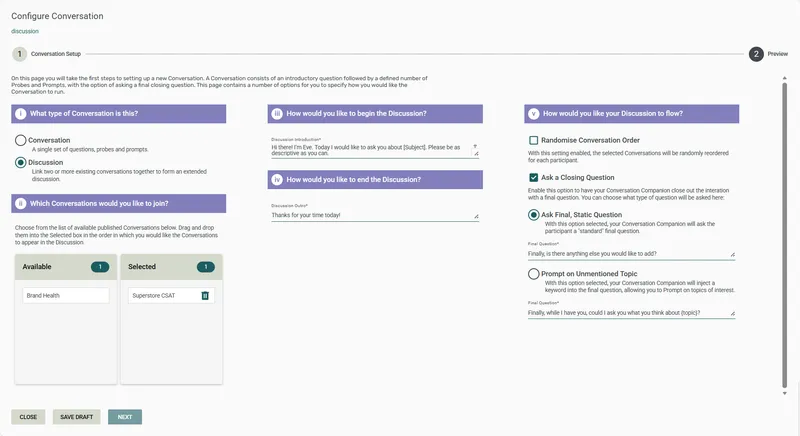
Select the conversations to include — drag and drop conversations from the Available list to the Selected list. You need at least 2 conversations. The order in the Selected list is the default presentation order.
-
Click Next.
-
Enter the Discussion Introduction — the opening message EVE shows at the start of the session.
-
Enter the Discussion Outro — the closing message EVE shows at the end of the session.
-
Configure flow settings:
- Randomise Conversation Order — check this box to randomise the order in which the selected conversations are presented to each participant. When unchecked, all participants receive conversations in the order set in the Selected list
- Ask a Closing Question — check this to add an optional question at the very end of the Discussion, after all conversations have run. If enabled, choose one of two options:
- Ask Final, Static Question — a fixed question asked the same way at the end of every session
- Prompt on Unmentioned Topic — a dynamic question where a random keyword from the model is inserted, prompting the participant on something they haven’t yet mentioned
- If a closing question is enabled, enter the question wording
-
Click Next.
-
(Optional) Set a Conversation Companion Name and Avatar — see Conversation settings. The companion settings apply across the whole Discussion session.
-
Click Preview Conversation to test the Discussion flow as a participant would. Click Back to return and adjust settings.
-
Click Publish to finalise, or Save Draft to save without publishing.
Editing a published Discussion
Section titled “Editing a published Discussion”If you change the Discussion settings (introduction, outro, flow options, companion), republish the Discussion for the changes to take effect.
If you change the settings of one of the included conversations, republish that conversation. The Discussion will automatically pick up the latest published version — you don’t need to republish the Discussion itself.
Frequently asked questions
Section titled “Frequently asked questions”Do all conversations in a Discussion need to be the same type?
No. You can combine AI Only, Guided AI, and Model Only conversations in the same Discussion. Each runs according to its own configuration.
Can I change the order of conversations within a Discussion?
Yes — reorder them in the Selected list during configuration. If you want the order to vary between participants, enable Randomise Conversation Order in the flow settings.
What’s the difference between the Discussion outro and a closing question?
The Discussion Outro is a closing statement from EVE — it’s not a question and doesn’t collect any additional data. The optional closing question (via Ask a Closing Question) is an actual question posed to the participant at the very end, before the outro. You can have both, one, or neither.
Can I add new conversations to a Discussion after it’s been published?
Yes, but you’ll need to make the change and republish the Discussion for participants to see the updated version. Any surveys already using the Discussion will pick up the latest published version automatically.
What does “Prompt on Unmentioned Topic” mean as a closing question option?
When this is selected, EVE dynamically generates a closing question that prompts the participant on a topic they haven’t mentioned during the Discussion — drawing from the keywords in the linked models. It’s useful when you want to ensure broad topic coverage without a fixed closing question.
What happens if one of the conversations in a Discussion is unpublished?
The Discussion will no longer be able to use it. Participants would encounter an error at that point in the session. Always check that all included conversations are published before running a live Discussion.
What happens after I publish?
The Discussion is ready to be inserted into a Survey Shaper survey, the same way as a single conversation. See Publish and deploy for the full deployment steps.